


ChatGPT is becoming a valuable traffic source. It may not appear in a Google Analytics 4 overview because the volume is small, but ChatGPT traffic is often the most engaging source, even more than organic search.
I base those observations on my experience optimizing client sites for AI answers.
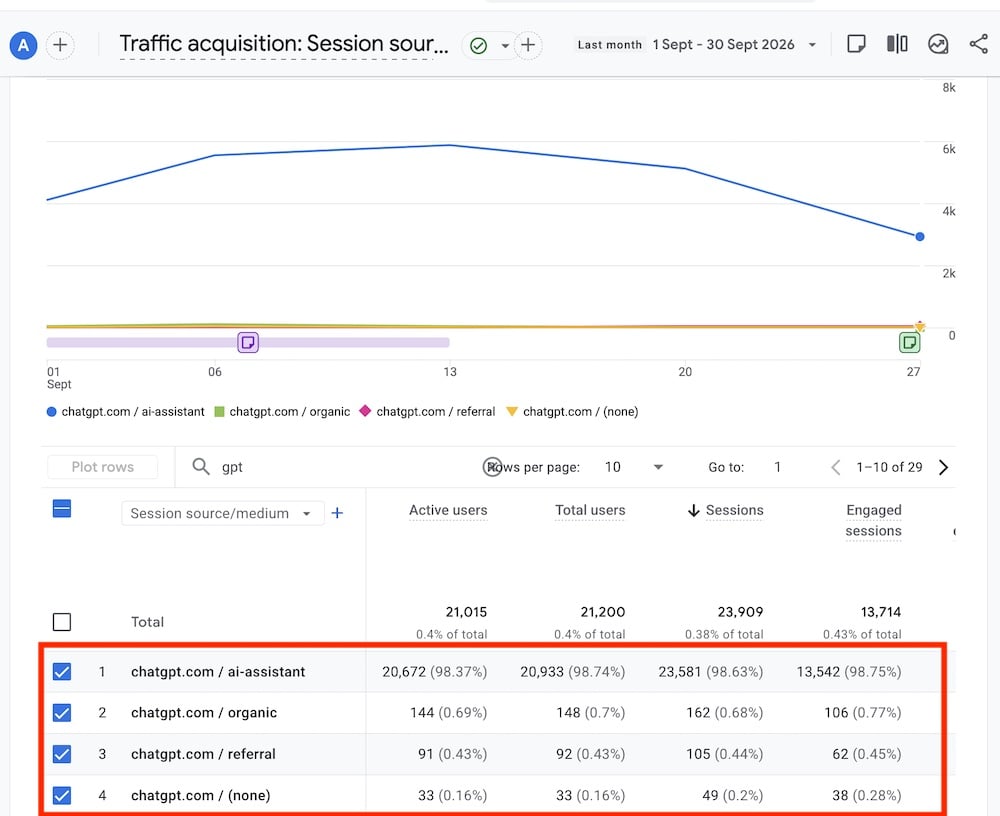
ChatGPT traffic is often the most engaging. Click image to enlarge.
I know of no studies examining why ChatGPT traffic performs well, but I have two theories:
- Like organic search, ChatGPT provides solutions to problems, with occasional links to external sites to learn more.
- People trust generative AI results because of the conversational format, akin to human dialogue.
The trend may change as genAI tools become mainstream. Until then, monitoring AI traffic is essential.
Track ChatGPT Referrals
In Google Analytics 4:
- Go to Acquisition > Traffic acquisition,
- Below the graph in the drop-down, choose “Session source / Medium,”
- In the “Search” field, type “gpt” and click “Enter” to filter session sources.
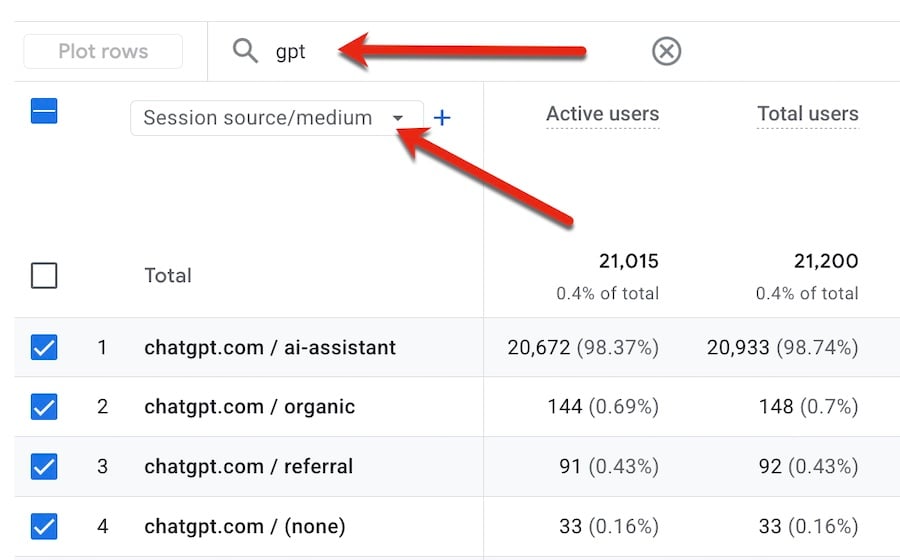
In GA4, go to Acquisition > Traffic acquisition. Click image to enlarge.
Then create custom reports to access the data quickly.
ChatGPT does not disclose actual user prompts, but we can surmise the content by exploring the landing pages of those users. Each page solves a problem. Thus the prompt presumably requested that solution.
Analyze ChatGPT Referrals
In GA4:
- Go to Engagement > Landing Pages,
- Click “Add filter” below “Landing page,”
- Select “Session source / Medium,”
- Select “Contains” and type “gpt”
- Click “Apply”

Build a “gpt” traffic source filter in GA4. Click image to enlarge.
This will filter traffic sources to those containing “gpt” and sort the landing pages by the most clicks from ChatGPT.
The resulting report will help identify pages that ChatGPT cites to solve relevant problems. From there, query ChatGPT to see the context of those citations, as in:
This is my URL: [URL]. What prompts would trigger ChatGPT to cite the page as a solution?
It is also a good idea to investigate these pages in more tools:
- In Search Console, find the “possible” AI Mode prompts that surface the page,
- In Bing Webmaster Tools, identify the grounding queries LLMs use to find that page.
Direct and Unassigned Channels
Google Analytics incorrectly classifies a percentage of ChatGPT traffic as either Direct or Unassigned because ChatGPT often adds a “noreferrer” attribute to external links. The attribute hides the referral for privacy reasons, causing GA4 to misattribute it.
Certainly that’s the case for most of my clients. GA4 assigns their (growing) ChatGPT traffic as Unassigned.
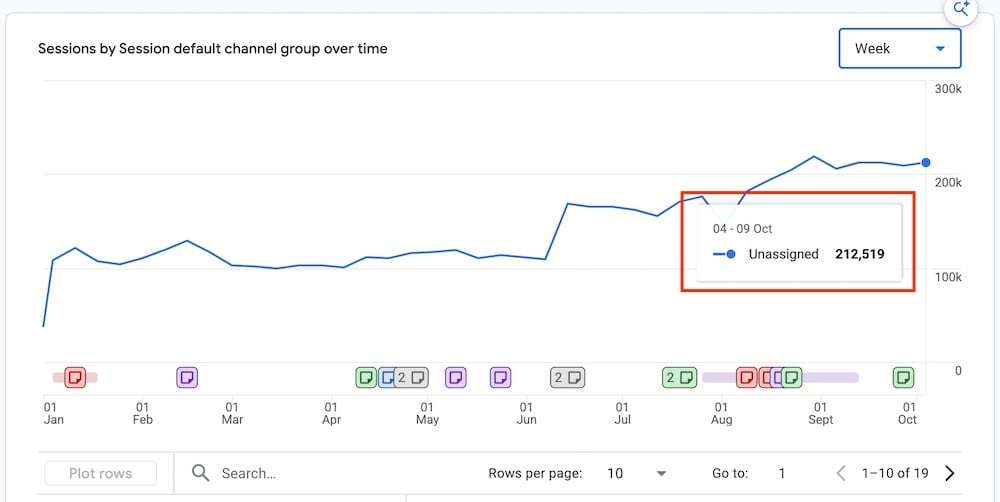
Unassigned traffic in GA4 is growing in this example. Click image to enlarge.





 AI Shopping Could Mean Fewer Returns
 New Ecommerce Tools: September 23, 2026
 Shopify Opens to Meta Muse; Amazon Balks
 New Ecommerce Tools: September 30, 2026
 Don’t Make Them Count
 New GSC Image Filter Aids Product Discovery